
pandas.plotting.autocorrelation_plot#
- pandas.plotting.autocorrelation_plot(series, ax=None, **kwargs)[source]#
Autocorrelation plot for time series.
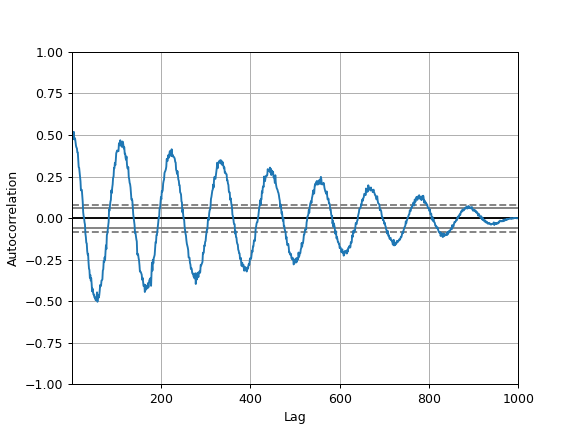
This method generates an autocorrelation plot for a given time series, which helps to identify any periodic structure or correlation within the data across various lags. It shows the correlation of a time series with a delayed copy of itself as a function of delay. Autocorrelation plots are useful for checking randomness in a data set. If the data are random, the autocorrelations should be near zero for any and all time-lag separations. If the data are not random, then one or more of the autocorrelations will be significantly non-zero.
- Parameters:
- seriesSeries
The time series to visualize.
- axMatplotlib axis object, optional
The matplotlib axis object to use.
- **kwargs
Options to pass to matplotlib plotting method.
- Returns:
- matplotlib.axes.Axes
The matplotlib axes containing the autocorrelation plot.
See also
Series.autocorrCompute the lag-N autocorrelation for a Series.
plotting.lag_plotLag plot for time series.
Notes
The autocorrelation at lag
his computed using the mean and variance of the whole series:\[r_h = \frac{\sum_{t=1}^{n-h} (x_t - \bar{x})(x_{t+h} - \bar{x})} {\sum_{t=1}^{n} (x_t - \bar{x})^2}\]This differs from
autocorr(), which computes the Pearson correlation between the overlapping portions of the series and its lagged copy, so the two can give different values for the same lag.Examples
The horizontal lines in the plot correspond to 95% and 99% confidence bands.
The dashed line is 99% confidence band.
>>> spacing = np.linspace(-9 * np.pi, 9 * np.pi, num=1000)
>>> rng = np.random.default_rng(42)
>>> s = pd.Series(0.7 * rng.random(1000) + 0.3 * np.sin(spacing))
>>> pd.plotting.autocorrelation_plot(s)